

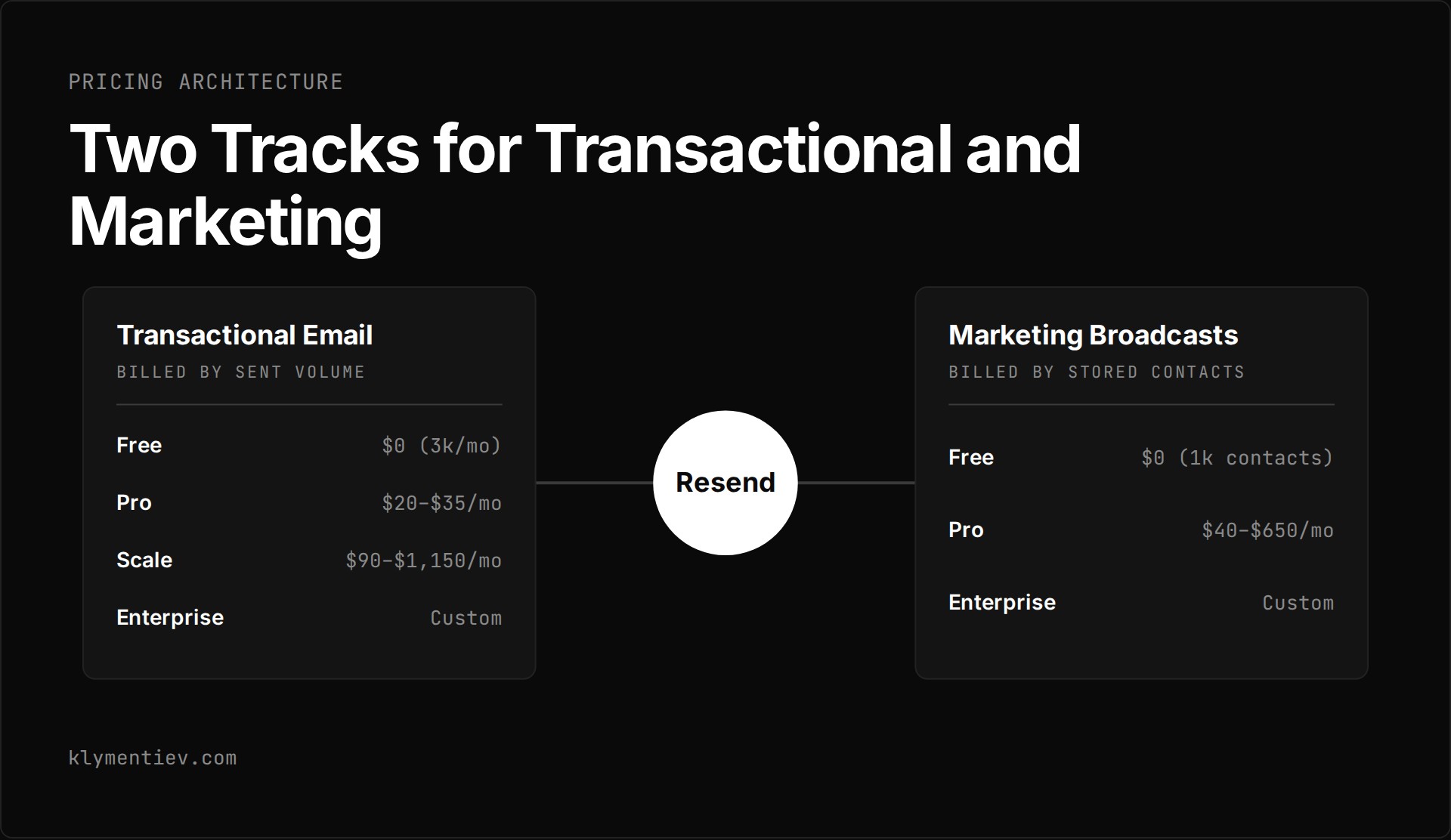
Resend is an email platform that provides separate paths for transactional emails and contact-based marketing broadcasts. As of 2026-11-01, both tracks are active and open for registration with monthly billing. Resend pricing starts with a free tier on both paths, while paid plans scale according to sent volume or audience size. There are no annual plans or annual discounts available.
How does Resend pricing work for transactional email?
Transactional plans are billed on a monthly schedule based on the number of emails you send each month. Pricing tiers progress across four levels: Free, Pro, Scale, and Enterprise.
The resend free plan costs $0 per month and includes 3,000 emails per month, with a restriction of 100 emails per day. It allows 3 domains, 30 days of data retention, 1 webhook endpoint, ticket support, and 5 AI credits per month. There is no pay-as-you-go overage on the free tier.
The resend pro price begins at $20 per month for 50,000 emails per month. A higher tier on Pro costs $35 per month for 100,000 emails. Pro removes the daily sending restriction and sets overage at $0.90 per 1,000 emails. It includes 10 domains, 30 days of data retention, 5 webhook endpoints, ticket support with deliverability expertise, and 100 AI credits per month.
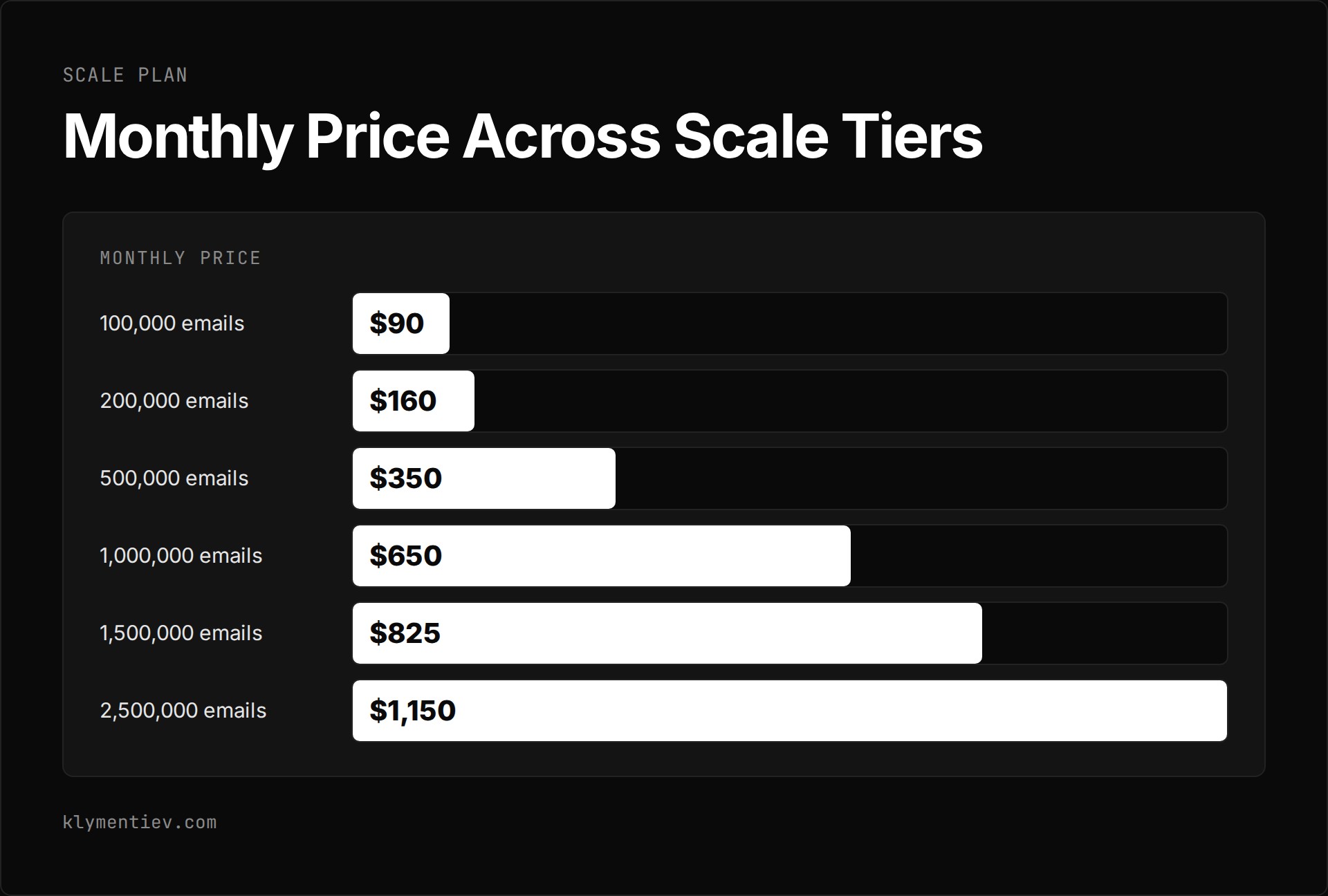
The resend scale plan targets teams that require dedicated support channels and higher volume. The tiers under Scale are:
- 100,000 emails per month for $90 per month, with overage at $0.90 per 1,000 emails.
- 200,000 emails per month for $160 per month, with overage at $0.80 per 1,000 emails.
- 500,000 emails per month for $350 per month, with overage at $0.70 per 1,000 emails.
- 1,000,000 emails per month for $650 per month, with overage at $0.65 per 1,000 emails.
- 1,500,000 emails per month for $825 per month, with overage at $0.52 per 1,000 emails.
- 2,500,000 emails per month for $1,150 per month, with overage at $0.46 per 1,000 emails.
Every Scale tier includes 1,000 domains, 30 days of data retention, 10 webhook endpoints, 500 AI credits per month, and Slack channel support with an urgent-response SLA.
Enterprise pricing requires custom agreements. It provides custom volume, flexible domain allocations, custom retention periods, flexible webhook endpoints, priority support, a dedicated Customer Success Manager, and guaranteed response times. You can inspect the current baseline tiers directly on the official pricing page. For teams evaluating infrastructure choices against other providers, see our comparison on Resend vs SendGrid and the analysis of Postmark pricing.
Transactional quotas count every outbound and inbound interaction. Sent and received emails both count against the monthly transactional quota. Inbound and inbox emails count toward the quota as well. In addition, each address listed in the To, CC, and BCC fields counts as a separate email against your total allocation.
How does marketing broadcast pricing work?
Marketing broadcasts operate on a separate billing track from transactional emails. Instead of charging per message sent, Resend calculates broadcast charges based on the total number of contacts stored in your account. Broadcast emails do not count against your transactional limits, but they can only go to existing contacts.
The Free marketing tier costs $0 per month. It supports up to 1,000 contacts, 3 audience segments, 3 domains, 10,000 automation runs, ticket support, and unlimited emails sent to those contacts.
Pro marketing plans expand contact capacity and segmenting options:
- 5,000 contacts for $40 per month.
- 10,000 contacts for $80 per month.
- 15,000 contacts for $120 per month.
- 25,000 contacts for $180 per month.
- 50,000 contacts for $250 per month.
- 100,000 contacts for $450 per month.
- 150,000 contacts for $650 per month.
Pro marketing includes unlimited segments, unlimited domains, marketing analytics, and 100 AI credits per month. Beyond 150,000 contacts, an Enterprise marketing plan is available with custom pricing.
What are the account add-ons and system limits?
Several infrastructure options and operational rules apply across the service. These are documented in the account quotas and limits documentation.
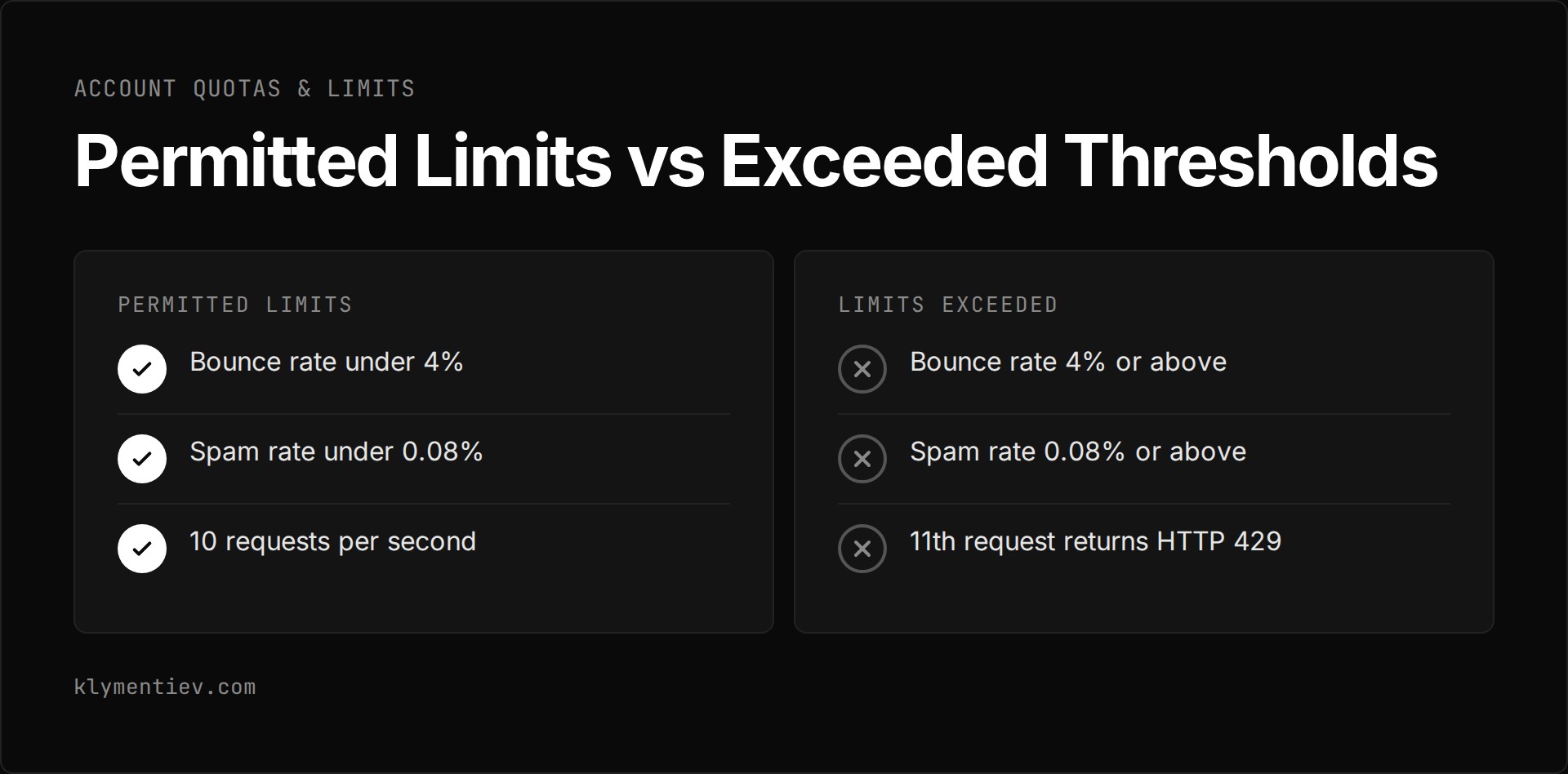
Understanding your throughput limits prevents sudden HTTP 429 errors in production, as the 10 requests per second cap applies across the entire team regardless of your tier.
The system enforces strict operational limits:
- The resend api rate limit is 10 requests per second per team, shared across all API keys. There is no burst allowance. The 11th request inside the same second returns an HTTP 429 status code. The pricing documentation notes that this limit is identical across all plans.
- The Batch Email API accepts up to 100 emails per call, and each call counts as one request.
- The free daily quota resets at midnight UTC, based on the UTC calendar day rather than a rolling 24-hour window.
- Paid plans support pay-as-you-go overage, which must be enabled under Transactional Overages in your account settings. Overage is billed in 1,000-email buckets. It is capped at 5x the monthly plan quota. If you reach that 5x cap, sending is paused until the next billing cycle. The cap can be changed by contacting support.
- To maintain service health, your bounce rate must stay under 4% and your spam rate must remain under 0.08%. Exceeding these thresholds may cause sending to be paused temporarily.
- Open and click tracking is included on every plan, including Free.
- AI credits reset each month and do not roll over. Running out of credits pauses only the AI features.
- Nonprofits can apply for a 50% discount on paid plans. There is no education pricing.
Add-ons can be purchased on top of monthly plans:
- Dedicated IPs cost $30 per month on Scale. This add-on is listed for customers sending over 3,000 emails per day.
- Extra domains cost $20 per month for 100 additional domains on Pro and Scale plans.
- Single sign-on (SSO) costs $150 per month on the Scale plan and is included on Enterprise.
- Automation runs include 10,000 per month; additional runs cost $0.0015 per run on paid plans only.
- Inboxes include 3 on all plans. Extra inboxes cost $1 per inbox per month on paid transactional plans only. They are off by default and must be enabled by an administrator.
The documentation does not state team member limits, attachment or message size limits, maximum recipients per email, or numeric API rate limits that differ across paid tiers.
Which route should you choose?
Your choice depends on whether your workload is driven by individual events or batch marketing campaigns.
| Plan | Monthly price | Volume or contacts | Domains | Webhook endpoints | Support level |
|---|---|---|---|---|---|
| Free Transactional | $0 | 3,000 emails/mo (100/day) | 3 | 1 | Ticket support |
| Pro Transactional | $20 to $35 | 50,000 to 100,000 emails/mo | 10 | 5 | Ticket support with deliverability expertise |
| Scale Transactional | $90 to $1,150 | 100,000 to 2,500,000 emails/mo | 1,000 | 10 | Slack channel with urgent-response SLA |
| Enterprise Transactional | Custom | Custom | Flexible | Flexible | Dedicated CSM and guaranteed response times |
| Free Marketing | $0 | 1,000 contacts | 3 | N/A | Ticket support |
| Pro Marketing | $40 to $650 | 5,000 to 150,000 contacts | Unlimited | N/A | Not stated |
Select your path using these technical parameters:
- Choose Free Transactional if your sending volume stays under 100 emails per calendar day and 3,000 emails per month.
- Choose Pro Transactional if you require pay-as-you-go overages, multiple webhooks, or send more than 100 emails in a single day.
- Choose Scale Transactional if you require dedicated IP management, Slack channel support with an urgent-response SLA, or more than 10 domains.
- Add Marketing plans separately if you send broadcast campaigns to an existing list of subscribers.
Frequently asked questions
What happens if you exceed your monthly sending quota?
On the free plan, there is no pay-as-you-go overage. On paid transactional plans, overage sending is billed in 1,000-email increments, provided pay-as-you-go is enabled in your settings. This overage is capped at 5x your monthly quota. If your account hits that 5x limit, email sending is paused until the next monthly billing cycle starts. The cap can be changed by contacting support.
Can you buy a dedicated IP address on any plan?
No. The page lists dedicated IPs on Scale at $30 per month. The add-on is listed for customers sending over 3,000 emails per day.
How does the free plan daily limit reset?
The free daily quota resets at midnight UTC. This reset follows the UTC calendar day rather than a rolling 24-hour period from when you sent the first email.
Does Resend offer discounts for annual billing or education?
Resend does not offer annual billing, annual discounts, or education pricing. Billing is strictly monthly. Nonprofits can apply for a 50% discount on paid plans.
