

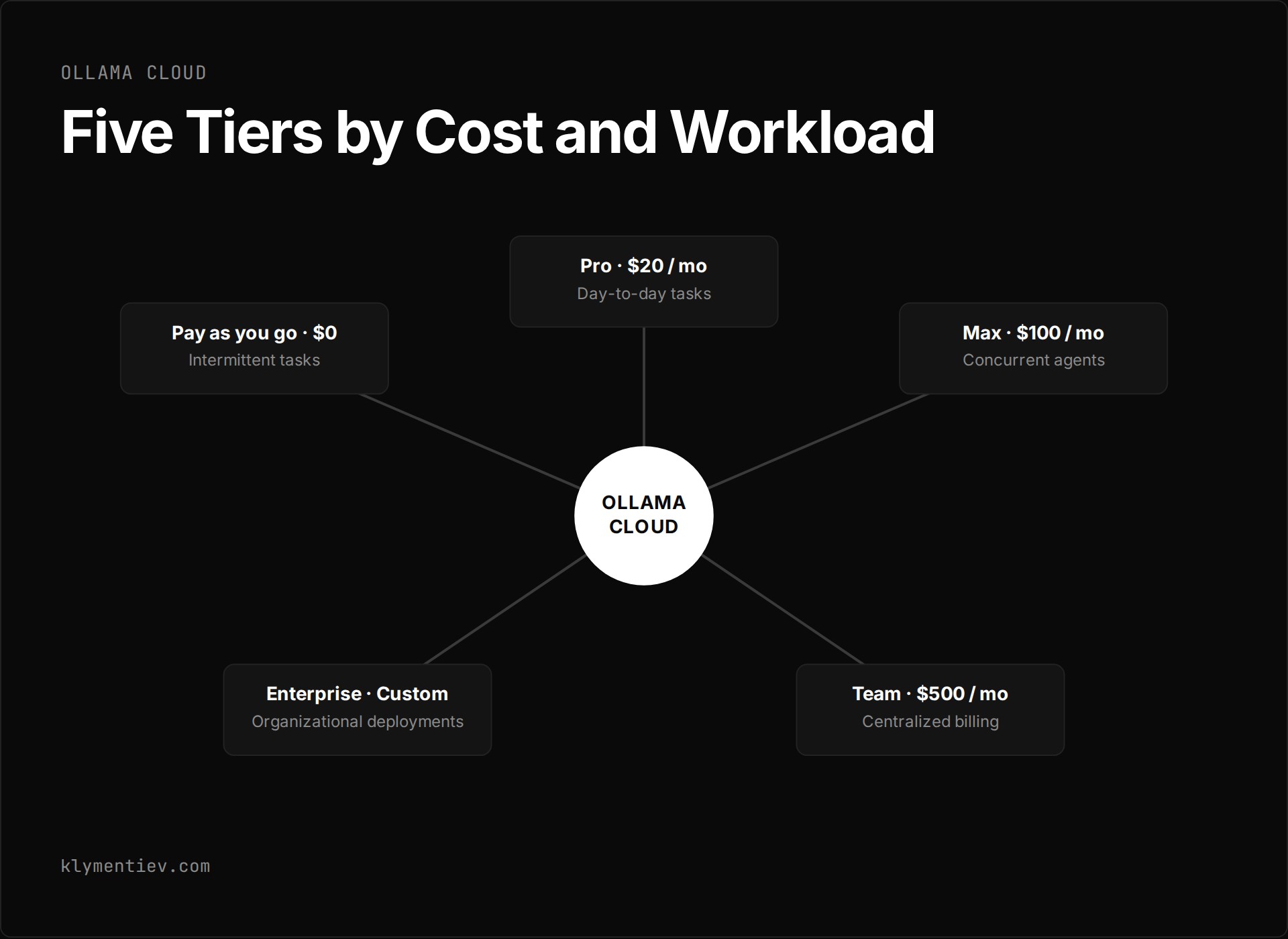
Ollama Cloud runs models in Ollama cloud infrastructure directly from your terminal or applications without requiring local downloads. As of 2026-11-01, the service is active across five tiers: Pay as you go, Pro, Max, Team in early access, and Enterprise. Running models on your own hardware remains free and always unlimited. You can sign in through the standard desktop application, invoke cloud models via command-line tools, or route traffic to hosted endpoints using standard API keys.
What does the Pay as you go plan offer?
The Pay as you go plan requires no monthly subscription and charges zero service fees. You pay strictly per token for every cloud model you invoke. This entry route fits developers who test remote endpoints intermittently or prefer variable expenses tied directly to raw token consumption.
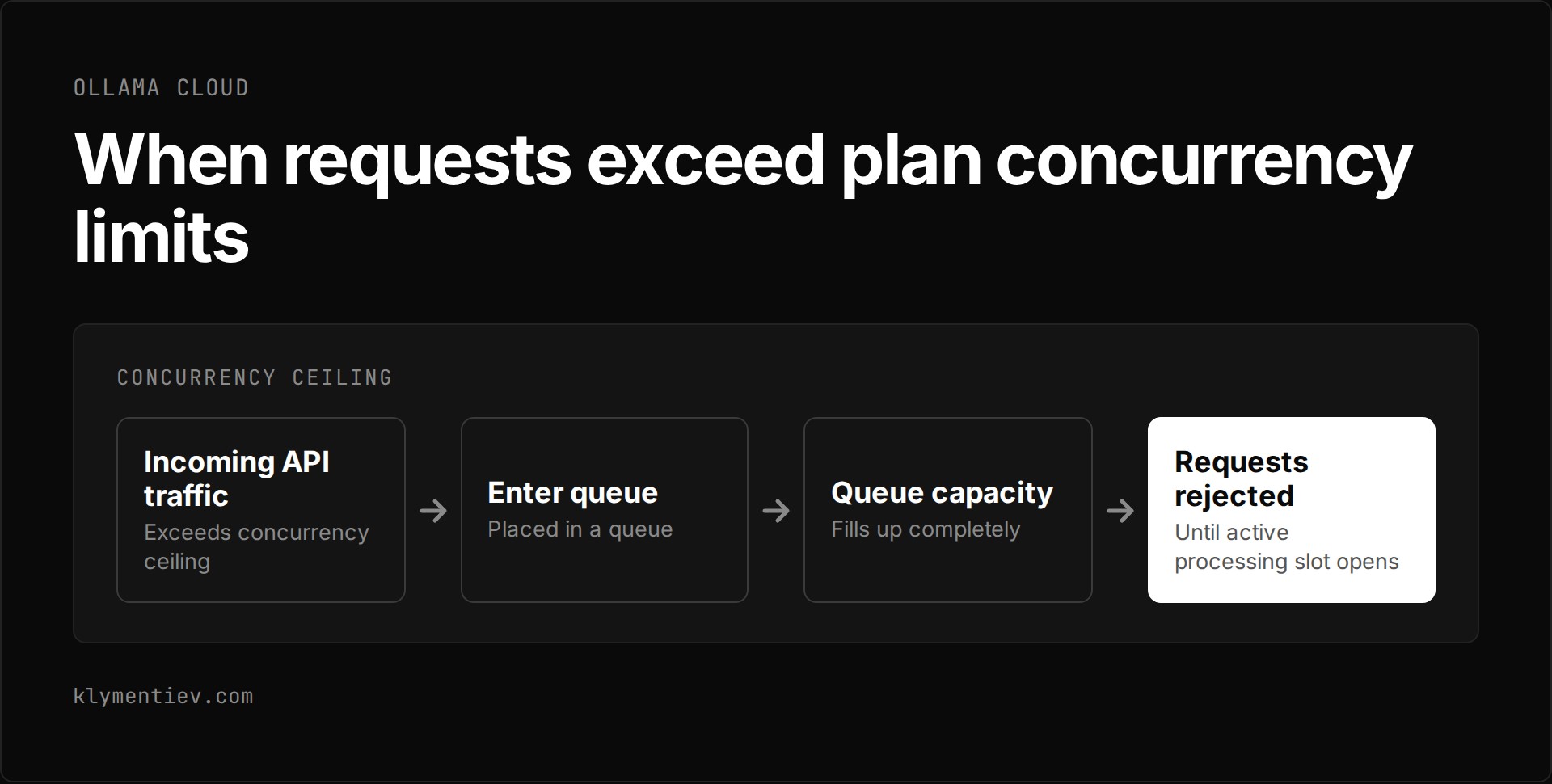
Under this plan, your account is restricted to 3 concurrent requests. Requests that exceed this concurrency limit enter a queue. If that queue fills up completely, additional incoming requests are rejected until an active processing slot opens. You can view the full rate sheet directly on the official Ollama pricing page.
What do you get with the Pro plan?
The Pro plan costs $20 per month on a monthly billing schedule, or $200 per year, which calculates to $16.67 per month when billed annually. Each billing cycle provides $60 of included usage credits. Ollama describes this tier as intended for shorter, well-defined day-to-day tasks.
Subscribing to Pro grants access to larger pro models that are not open to the base tier. Ollama lists fast mode as coming soon for Pro users. To help you manage costs, paid subscriptions send an automated email notification when consumption hits 90 percent of the included monthly usage credits, though you can turn this reminder off in your account settings.
What does the Max plan provide?
The Max plan costs $100 per month and includes $300 of monthly usage credits. Ollama describes this tier as built for power users who run multiple agents simultaneously. It expands your throughput capacity by raising the concurrency boundary to 10 concurrent requests.
In addition to higher volume, Max subscribers receive early access to the newest models published to the catalog. When traffic spikes beyond the 10 concurrent request threshold, excess requests are queued, and any calls arriving while the queue is full are rejected until current tasks finish. The 90 percent usage notification applies to this tier as well.
How does the Team plan operate?
The Team plan costs $500 per month and is currently in early access. It allows unlimited users under one organizational umbrella and supplies $1,000 of monthly usage credits shared across the entire team.
This tier introduces centralized billing and administration. Team plan subscriptions also include priority support for resolving operational issues.
What is included in the Enterprise plan?
The Enterprise plan operates on custom pricing tailored to larger organizational deployments. It adds administrative controls that allow administrators to configure model access controls across the organization.
Enterprise customers can establish custom cost budgets per user and per API key to prevent unexpected overages. Ollama provides a private Slack channel for technical coordination and accommodates custom security questionnaires. You can check further technical specifications in the official Ollama Cloud documentation.
How do you set up and use Ollama Cloud?
To use cloud models from your local workstation, open the Ollama desktop application or run the ollama command in your terminal, then follow the setup prompts to sign in. Cloud models run remotely, so they require no local file downloads. In the application and CLI, a cloud model uses a distinct cloud identifier such as gemma4:cloud. When addressing the same model through the API, you specify its standard tag such as gemma4:31b. The CLI can also launch coding agents directly with commands like ollama launch claude, ollama launch codex, and ollama launch opencode.
For backend integrations, generate an access key at ollama.com/settings/keys and export it in your environment as OLLAMA_API_KEY. Send your requests to https://ollama.com/api/chat with an Authorization: Bearer header. The full catalog of hosted models is indexed at https://ollama.com/api/tags and searchable on ollama.com/search?c=cloud. The platform supports tool calling natively. Standard OpenAI and Anthropic client libraries are also compatible with the endpoint, though each client library supports only a subset of the original API. You must keep the API key out of browser code and out of source control.
Data handling follows explicit privacy boundaries. Ollama states that prompt or response data is never logged or trained on. The documentation confirms that Ollama processes cloud prompts and responses to answer requests and does not use them to train models. Infrastructure is hosted primarily in the United States, with requests routed to Europe when additional capacity is required. Ollama hosts open models with NVIDIA Cloud Partners, who must have no logging, no training and zero data retention policies. Model weights match native weights released by providers, though modern NVIDIA hardware may run formats like NVFP4. If you decide to restrict your environment to local hardware, cloud features can be disabled entirely.
Which Ollama Cloud route fits your workload?
Choosing an operational plan depends on your concurrency demands, credit requirements, and administrative overhead. The table below details the five available routes verified as of 2026-11-01.
| Plan | Monthly Cost | Included Monthly Credits | Concurrency Limit | Primary Features and Target Use |
|---|---|---|---|---|
| Pay as you go | $0 | $0 | 3 concurrent requests | Direct token billing with no service fees for intermittent tasks |
| Pro | $20 ($200 annually) | $60 | Not specified | Larger pro models and upcoming fast mode for daily tasks |
| Max | $100 | $300 | 10 concurrent requests | Early access to newest models for running concurrent agents |
| Team | $500 (early access) | $1,000 | Not specified | Unlimited users, shared pool, priority support, centralized billing |
| Enterprise | Custom | Custom | Custom | User cost budgets, model controls, private Slack, custom security |
Accounting mechanics function identically across paid tiers. Usage is measured in tokens at each model's published rate. Included plan credits are deducted first; once those are exhausted, your account begins consuming purchased usage credits. Included credits reset monthly on the exact day your subscription began, including for accounts billed annually. Unused included usage does not roll over to subsequent months. If you switch plans mid-cycle, your usage counter resets immediately to the new plan's full monthly allocation.
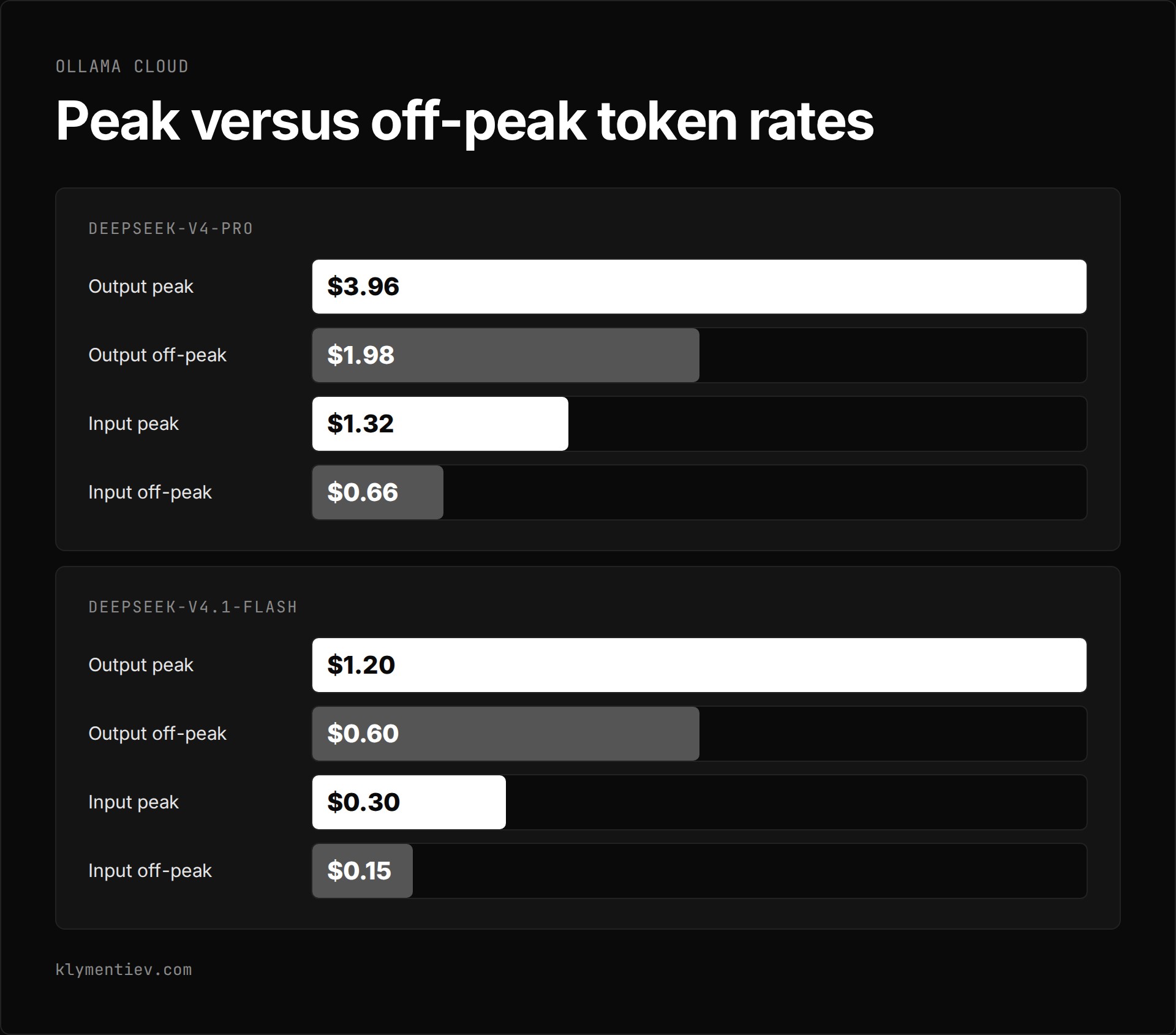
Token rates vary significantly by model architecture and execution windows. The table below outlines representative sample prices per one million tokens across input, cached input, and output streams.
| Model | Input per 1M Tokens | Cached Input per 1M Tokens | Output per 1M Tokens | Pricing Conditions |
|---|---|---|---|---|
| gpt-oss:20b | $0.07 | $0.035 | $0.30 | Standard rate |
| gpt-oss:120b | $0.15 | $0.014 | $0.60 | Standard rate |
| gemma4 | $0.14 | $0.05 | $0.40 | Standard rate |
| deepseek-v4.1-flash | $0.30 | $0.006 | $1.20 | Peak rate |
| deepseek-v4.1-flash | $0.15 | $0.003 | $0.60 | Off-peak rate |
| deepseek-v4-pro | $1.32 | $0.044 | $3.96 | Peak rate |
| deepseek-v4-pro | $0.66 | $0.022 | $1.98 | Off-peak rate |
| glm-5.3 | $1.40 | $0.26 | $4.40 | Standard rate |
| kimi-k3 | $3.00 | $0.30 | $15.00 | Standard rate |
| mistral-large-4 | $0.70 | $0.07 | $2.10 | Standard rate |
Off-peak pricing applies outside 12:00 to 18:00 UTC on weekdays, and across all hours on weekends, for models that explicitly publish off-peak rates. Live consumption metrics appear at ollama.com/settings/usage, which also displays upcoming retirements for models you used recently.
Frequently asked questions
What happens when you exceed plan concurrency limits?
When your incoming API traffic exceeds the concurrency ceiling assigned to your plan, additional requests are automatically placed in a queue. If the queue reaches capacity, Ollama rejects subsequent requests until an active processing slot becomes free.
How do included usage credits work and reset?
Included credits reset every month on the anniversary day your subscription began, even on annual billing plans. Ollama applies included credits first before billing against purchased usage credits. Unused credits from your monthly allowance never roll over into the next cycle. If you change your plan tier, the system resets your usage counter immediately and awards the new tier's full monthly balance.
Does Ollama Cloud store or train on user prompts?
Ollama states that prompt or response data is never logged or trained on. The documentation specifies that Ollama processes cloud prompts and responses to answer requests and does not use them to train models. Hosting takes place primarily in the United States with spillover routing to Europe for extra capacity. Open models run through NVIDIA Cloud Partners, who must have no logging, no training and zero data retention policies.
How do cloud model retirements affect local downloads?
Cloud model retirements apply solely to the hosted remote infrastructure and are flagged in advance at ollama.com/settings/usage for models you recently ran. Retiring a model from the cloud catalog has no effect on local weights or downloads. Running models on your own machine with Ollama remains completely free, independent, and always unlimited.
