
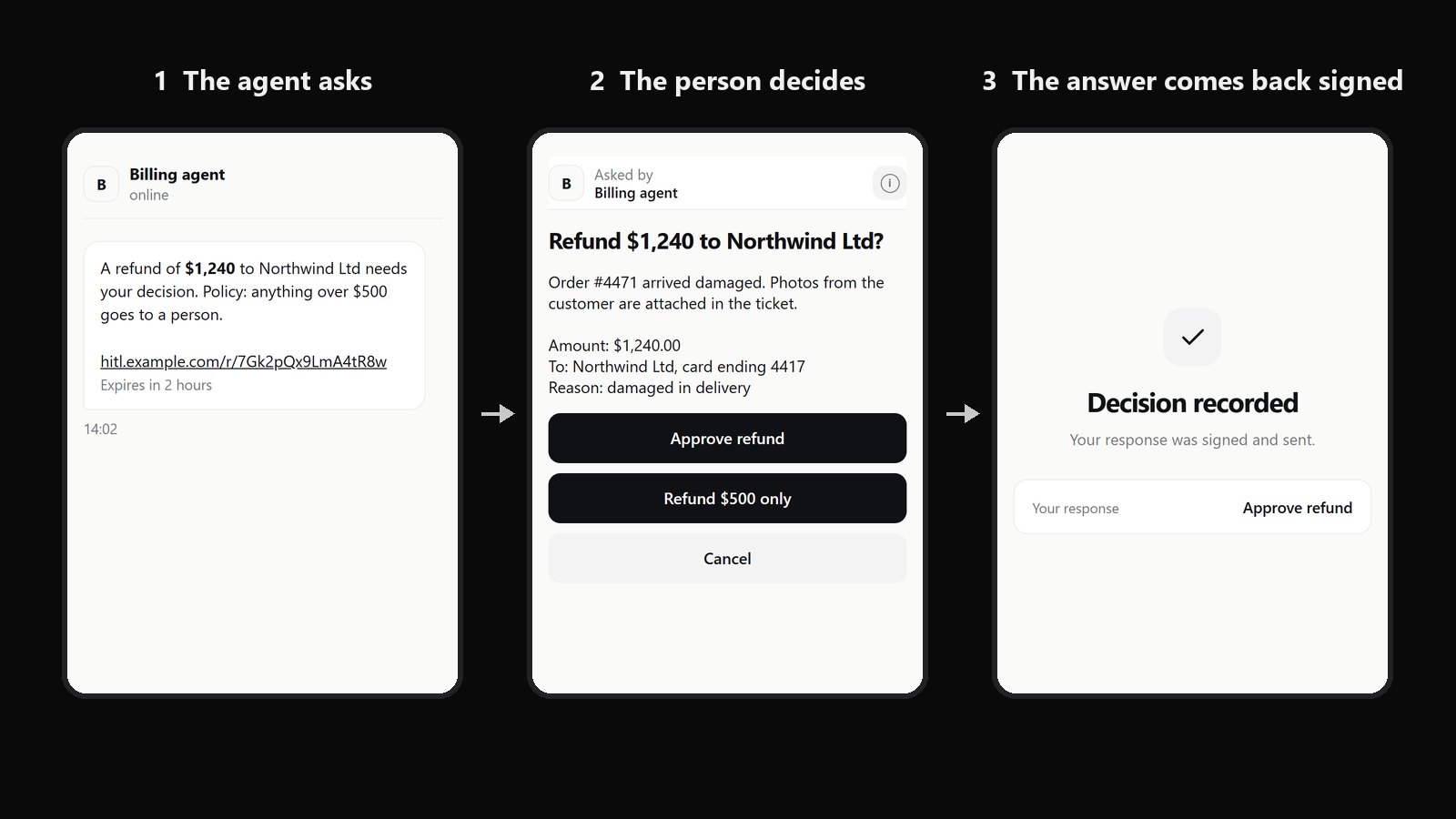
An AI agent asks for permission. Someone presses Approve, and the agent acts. Usually all that remains is a row in a database that says a user account clicked. I built hitl, an open-source service that turns a human decision into a signed object the agent can verify on its own, without trusting the server in between. This post explains why, how it works, and where it still cannot be trusted.
The scene
An agent has drafted a reply to a customer. It offers a refund of $1,240. Company policy says anything over $500 needs a person, so the agent pauses and asks.
A notification arrives. The person reads a summary, presses Approve, and the agent sends the email.
A week later the customer disputes the amount, and someone asks: who approved this, and what did they see?
The record says: approved_by: user_17, approved_at: 14:02. That is all.
What "user clicked Approve" does not prove
Three things are missing from that record.
Who answered. The row says an account clicked. It was written by the same platform that runs the agent, and anyone with write access to that database could have written it. Nothing in it is signed by anything the person controls.
What they saw. The summary was rendered by the platform. If it said $124 while the email said $1,240, nothing in the record would show it. The approval is not tied to the content.
When, and for what. The row is not tied to one request, one version of the content and one deadline. An approval can be reused for a similar action, or held back and released after the moment it was meant for.
For a human operator these gaps are tolerable, because people hesitate. Agents do not. They act fast, at volume, and they will act on whatever approval reaches them.
The idea: make the decision an object
The fix is to stop treating approval as a feature of the interface and treat it as a small protocol. The decision should come back as an object that:
- is signed by a credential pinned to the person, not written by the platform;
- names the exact request, including hashes of the content shown;
- carries the request's deadline, so a late answer is not an answer;
- can be checked by the agent using only what the agent already holds.
The last point is the important one. I call the rule nothing on the service's word: the server that relays requests and answers may be wrong, misconfigured or compromised, and the protocol should still not let the agent accept a false approval.
How it works
- The agent mints a request id and a one-time answer key, encrypts the request to the person and sends it to the relay. The relay stores the ciphertext and returns a short link.
- The agent delivers the link itself, by email, chat or whatever channel it already uses.
- The person opens the link and unlocks their key with a passkey. The browser decrypts the request and checks its facts.
- The person chooses an answer and signs it with the passkey. The page seals the answer to the agent and hands it to the relay.
- The agent fetches the answer, verifies the signature, the request, the content, the deadline and the schema, and acts once.
Four decisions carry most of the weight.
The agent creates the request, not the relay. The agent picks the request id, the creation time, the lifetime and a fresh key for the answer, and signs all of it. The relay mints nothing. It cannot rename a request, extend its life or redirect the answer.
The person decrypts and signs with a passkey. Passkeys (WebAuthn) sign but do not decrypt, so each person also has an encryption key. Its private half is stored wrapped by a key that only the passkey can produce, through the WebAuthn PRF extension. Opening a request takes a gesture on the person's device, unless they have unlocked a session (more on that below), and decryption happens in the browser.
The answer is sealed to the agent and bound to everything. The page encrypts the answer to the agent's one-time key, so the relay cannot read it. The signed record includes a hash of the agent's signed request and hashes of the content in clear, so the signature covers who asked, the deadline, the policy and what was shown. Answers are padded to 4 KB blocks, so a one-word "yes" and a long comment look the same size.
The agent checks everything itself. Before acting, the agent verifies the passkey signature against keys it pinned earlier. It checks that the record names a request it created, that the content hashes match what it sent, that the answer fits its own list of allowed answers, and that the answer arrived before its own deadline by its own clock. Then it marks the answer used. If the relay is down, the agent holds. It never treats silence as consent.
Two more pieces make this practical.
Keys the relay cannot swap. When a person adds a device, the change is published as a statement signed by a device they already had, chained to the previous one. An agent pins a person's keys once, by comparing a short fingerprint the person reads from their own screen. After that it follows only signed changes.
Strictness chosen per decision. For a large refund the agent can require a fresh gesture for this one answer. For routine choices it can accept a device session that the person unlocked within, say, the last hour. Then several small decisions can be answered from a queue, each still signed on its own.
Agents use it through three MCP tools: list_recipients, ask_human and check_human. The agent delivers the link itself over whatever channel it already uses. A small bridge verifies and consumes the answer and wakes the agent.
The full protocol, with field lists and verification rules, is in the specification in the repository: github.com/dklymentiev/hitl (Apache-2.0).
What an agent can ask
None of this is tied to an Approve button. The agent builds the page for each request: what to show and which answers it will take. The same signature and the same checks cover all of it.
What it can show. Plain text. Its own designed page in HTML, with its own look but no scripts. Photos. PDFs, rendered page by page right on a phone. Video and audio with a player. Any other file as a download. Everything is encrypted before it leaves the agent, large files included (up to 250 MB by default).
What it can take back. Buttons with its own labels, as many as it needs. Form fields: short text, long text, a number with limits, a date, one option from a list, several options from a list, a checkbox. An optional comment. Buttons and a form can sit on the same page.
Here is what the person sees, in five everyday cases, on a phone and on a laptop.
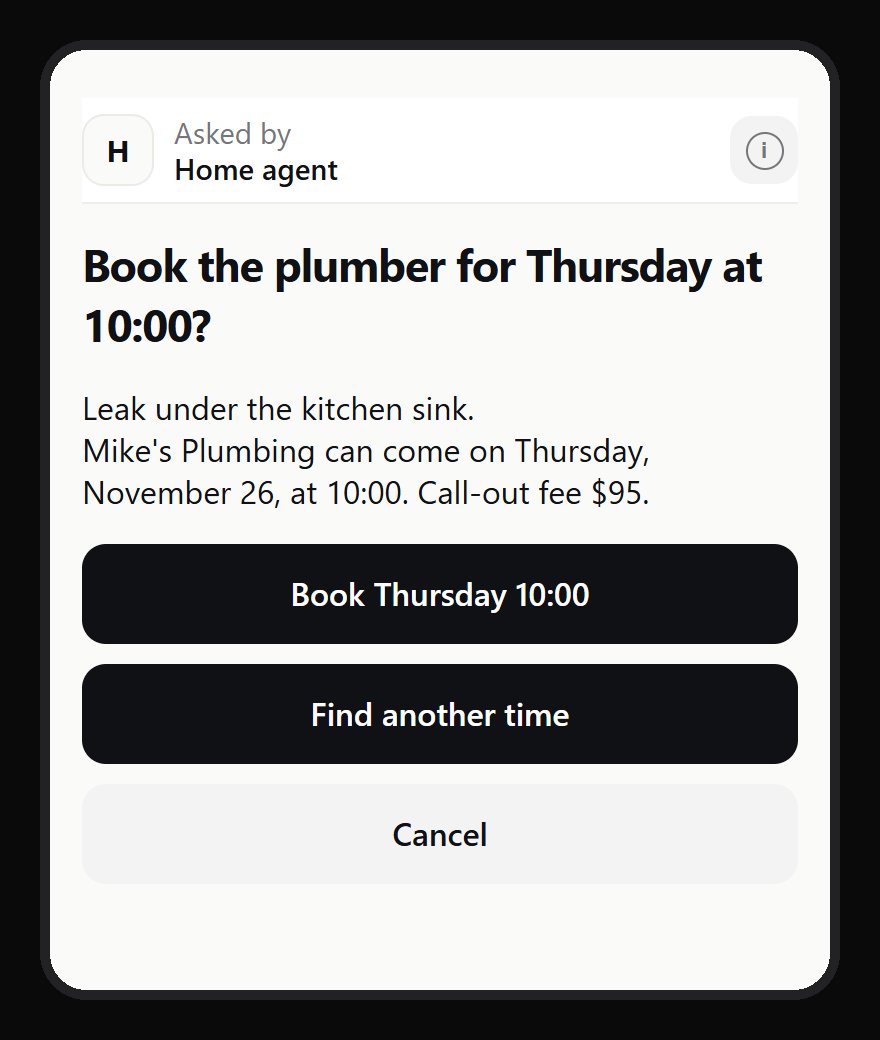
Yes or no. The plumber can come on Thursday at 10. Two buttons of the agent's choosing, and Cancel, which the page always adds.
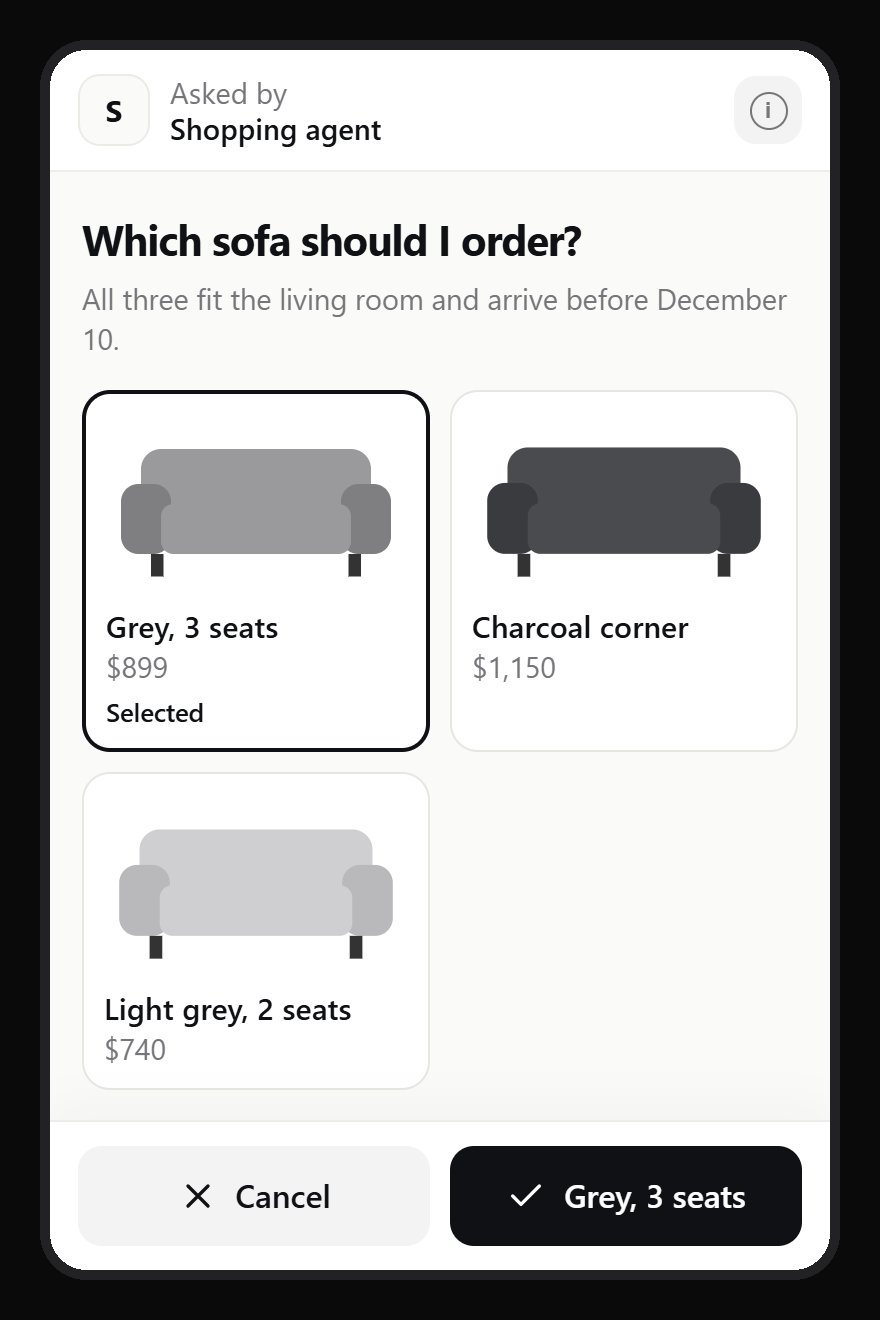
Pick one from pictures. The agent found three sofas within the budget and lays them out as its own designed page. One tap selects, and the confirm button repeats the choice.
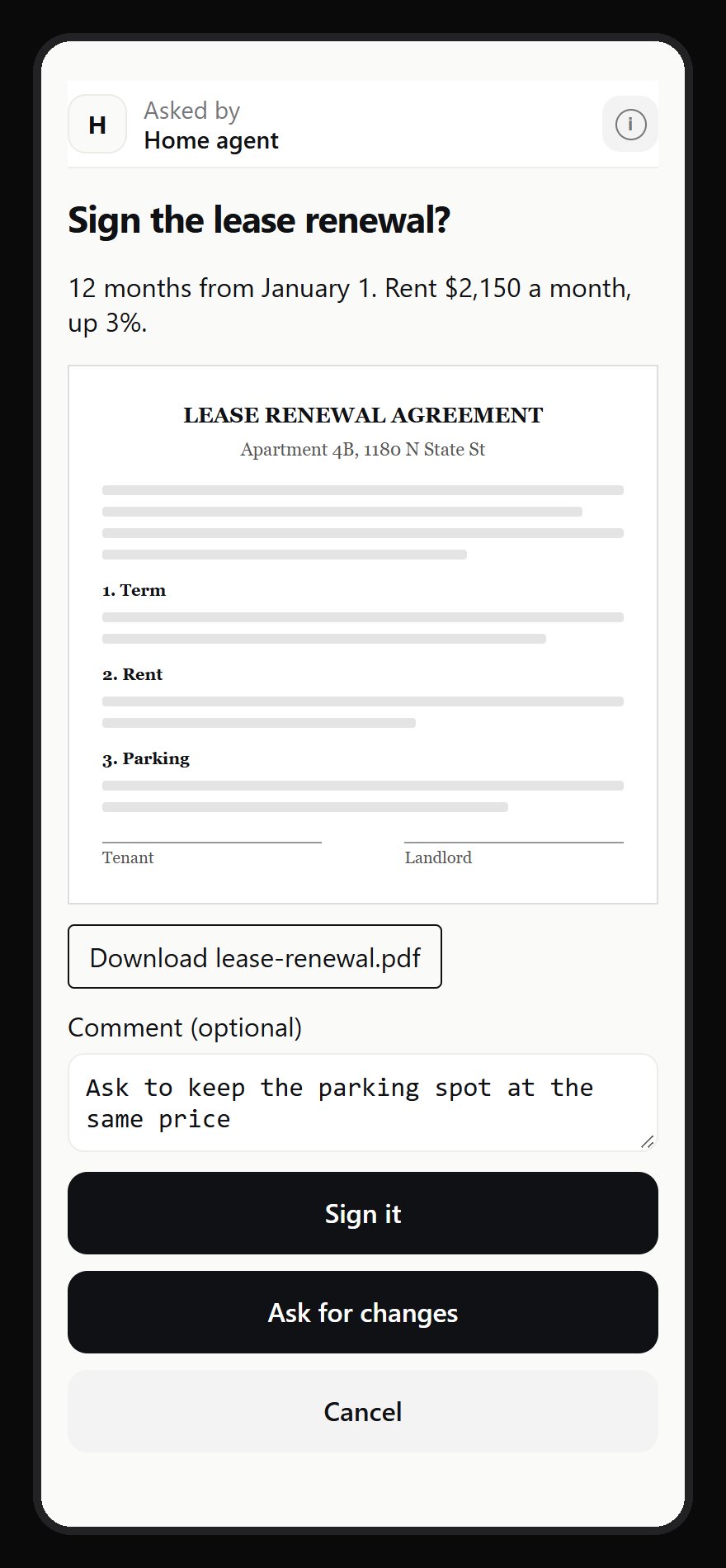
Read before you sign. The lease renewal arrives as a PDF, shown page by page on the phone, with a download link. The person answers "Sign it" or "Ask for changes" and writes what to change.
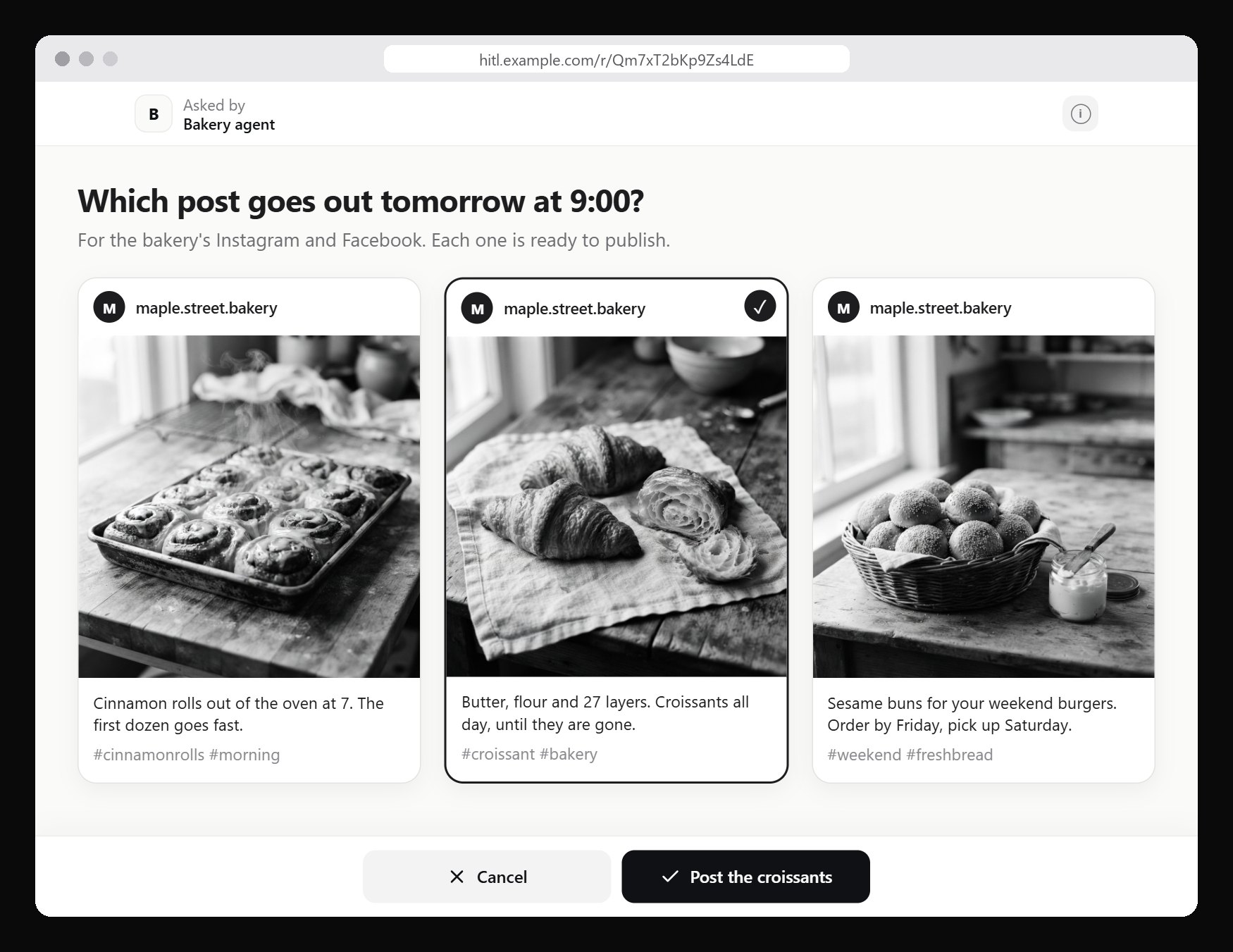
Choose tomorrow's post. A bakery's agent has written three posts for Instagram and Facebook, each with its own photo and caption. The owner picks one on a laptop, and only that one goes out at 9:00.
Fill in a form. A school trip, laid out the way the agent wants: a size picker, allergies as pills, a phone number, a date, a consent switch and a note for the teacher, with the trip details beside it. The agent gets back exactly these fields, typed, and a required one left empty stops the answer from being sent.
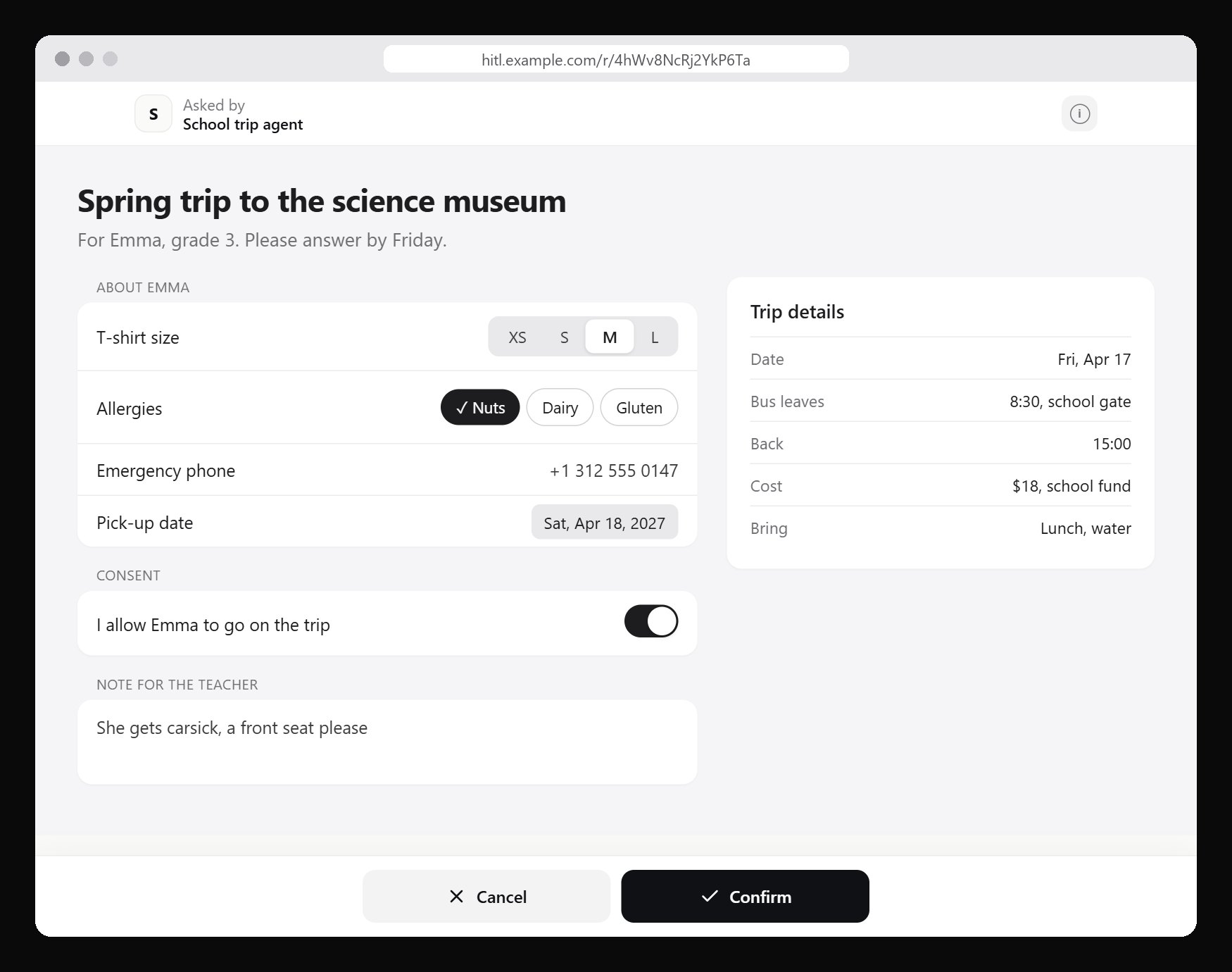
The same works for a video ("here is the one-minute slideshow for grandma's 80th birthday, send it to the family chat?") and for a long form, such as a yearly tax checklist with dozens of questions on one page. The sofa, bakery and school trip pages are the agent's own design: it may style its page and its form controls as it likes. The bar with the agent's name at the top and the Cancel and Confirm buttons at the bottom belong to the service, and no agent can restyle them.
The agent checks every answer against its own list of what it asked for. A missing required field, a number outside its limits, an option that was not offered, or a field nobody asked for means the answer is refused, however it got there. And because the signed record covers hashes of everything shown, the signature also says which PDF, which photos and which video the person had in front of them.
One thing is not there yet: the person can see files but cannot attach one to the answer.
What a signed answer does and does not prove
It is easy to overclaim here, so precisely:
- A valid answer proves that a credential pinned to that person produced it, with user verification on the device. It does not prove that the person read the request carefully or understood it. No signature can.
- Who the person is is established once, at enrolment. The deployment checks identity through a single sign-on provider it already trusts, or through an operator who hands out a one-time enrolment link.
- A synchronised passkey lives in the person's passkey account and can sign from any of their devices. If you need one specific device, enrol a hardware key.
- "Bound to the content the person saw" holds when the browser received the genuine page.
- "Used once" applies to the approval, not the action. If the agent crashes after acting and before recording that it acted, it may act again. Making the action itself idempotent is still the agent's job.
The fourth point is the biggest limit.
Where it cannot be trusted yet
The relay serves the page. In this version the person decrypts and signs inside a web page that the relay itself serves. A malicious relay could serve modified code that leaks the content or changes the answer before it is signed. To make that detectable, the client has no build step: the files in the repository are the files served. Every file is listed with its hash and loaded with Subresource Integrity, and a tool compares a live deployment with a checkout. That catches a deployment changed for everyone. It cannot prove what one particular person was served. An installed client with a pinned code hash is the path to closing this.
The relay knows the metadata. It sees who asks whom, when, the agent's reference string, and whether and when a request was opened and answered. It cannot read the content or the answer.
The relay decides delivery. It can delay an answer until the agent's deadline passes, or show an already answered request again. The agent will refuse a late answer, but it cannot force a timely one.
A relay can fake a question. People do not pin agents' keys, so a lying relay could show a request it made itself under a real agent's name and read the reply. No real agent will accept that reply. The person has still answered a question nobody asked.
An unlocked device is unlocked. While a session lives, anyone holding the device can read pending requests and answer those whose agents accept sessions.
Not built yet: withdrawing a pending request, retiring a single device, rotating the encryption key, data retention and rate limits.
How it has been used so far
Since 11 October 2026 the service has run in my own day-to-day agent operations. This is a pilot: one person (me) answering with one passkey, 24 registered agents and automated workflows, 10 of which have actually asked something. Of the requests created up to 19 November 2026:
- agents created 237 requests;
- 184 were answered and signed;
- 6 were opened and left unanswered;
- 46 were never opened and expired;
- 1 was still waiting at the time of the snapshot.
Half of the signed answers came within 7 minutes; three quarters within 36 minutes; one in ten took more than 9 hours.
Agents asked for a fresh gesture in 174 requests and accepted an unlocked session in 63. Of the signed answers, 142 were confirmed with a fresh passkey gesture and 42 from an unlocked session.
Because the relay only ever holds sealed answers, it cannot say how many were approvals and how many refusals. That split lives with the agents.
None of this shows the protocol is secure. It shows that the friction is bearable: a passkey gesture, a short review, a signed answer, many times a day.
Two things surprised me. Most requests (204 of 237) came from the content pipeline, which asks before publishing anything. And a fifth of all requests were never opened. That says less about the protocol than about which questions really needed a person.
What I am asking for
The protocol is my own design on top of WebAuthn, libsodium sealed boxes and Ed25519. It went through three rounds of review while I built it, each removing a place where one party took another's word for something. It has not had an independent security review, and I am looking for reviewers.
If you work on authentication, applied cryptography or agent safety, I would value your attempt to break it. The specification and the code are at github.com/dklymentiev/hitl. How to report a security problem privately is in the repository's SECURITY.md.
Further reading
- W3C, Web Authentication Level 3, with the PRF extension.
- W3C, Secure Payment Confirmation.
- WebAuthn Level 1 transaction authorization extension (txAuthSimple), removed from Level 2 as unimplemented.
- OpenID Connect CIBA, with
binding_messageto match a request across devices. - CISA, number matching in MFA apps.
- LangGraph, pausing a graph with
interruptfor a human decision.
