Mesh Memory / Multi-Agent Server Memory
Why this exists
Mesh is a semantic memory for AI agents and humans that finds your notes by meaning, not keywords. I had 600 notes scattered across files, folders, and chat logs -- decisions made three months ago, worklogs from last week, research from yesterday. Finding anything meant remembering the exact words I used. "Did I call it a caching strategy or a performance optimization?" If I guessed wrong, the note was invisible. I needed a self-hosted vector search system that understood ideas, not just matched strings.
Regular search is keyword matching. It finds exactly what you typed and nothing else. But when you are looking for something you wrote months ago, you rarely remember the exact words. You remember the idea. "That thing about making the API faster." Mesh finds it because it understands that "making the API faster" and "Redis caching layer for response times" are the same idea expressed differently.
After 600 notes, it was clear that keyword search does not scale for knowledge management. After 8,000 notes, semantic search is not a nice-to-have. It is the only way to find anything.
What it does
You save a note: "changed the login page to fix the auth problem." A month later you search for "security issues on the website", and Mesh finds your note. Even though you never used the words "security", "issues", or "website." Because Mesh understands that these ideas are related.
Mesh is a memory server that runs on your own machine. You save notes, decisions, worklogs, and research. Later you search by describing what you are looking for in plain language. The AI model inside the container converts both your documents and your search query into vectors, then finds the closest match by meaning.
What makes Mesh different from a personal wiki or a notes app is workspaces. Create a workspace for marketing, another for sysadmin, another for brand voice. Each workspace is an isolated memory pool. An AI agent assigned to the marketing workspace sees only marketing context. But when you need cross-domain thinking, you can search across multiple workspaces with weighted priority: 70% from marketing, 20% from brand voice, 10% from competitor research. The agent gets context from all three, ranked by relevance and your priorities.
Everything runs locally. The embedding model is baked into the Docker container. No OpenAI calls, no cloud APIs, no subscriptions. Your decisions and notes never leave your server.
Results & Impact
Running in production with over 52,000 documents across 21 workspaces. The default workspace alone holds 8,400+ documents: worklogs, architecture decisions, research notes, brand guidelines. Specialized workspaces store 26,000+ job listings for a freelancer matching system, 1,400 code index entries for a codebase search tool, and hundreds of documents for roles like sysadmin, marketing, security, and content management. 102 projects tracked, 6,500+ tags in use.
Agents in different roles (sysadmin, content manager, developer, marketing) each work with their own workspace. They save their findings and search for context from previous sessions. The memory grows with use and becomes more useful over time as auto-tagging infers patterns from similar documents.
Search works across 100+ languages thanks to the multilingual-e5-base embedding model. A question in English finds a note written in Russian. A vague description finds a specific technical document.
Key Features
- Semantic Search. Search by meaning, not keywords. "Login problems" finds "authentication bug." Works across 100+ languages with the multilingual-e5-base model running locally.
- Workspaces. Isolate memories by role or project. Marketing, sysadmin, developer, brand voice. each workspace is a separate memory pool. Cross-workspace search with weighted priority.
- Smart Auto-Tagging. Three levels: default tags on save (date, source), neighbor inference after embedding (copies common tags from 7 most similar documents), and manual tags that always take priority.
- MCP Server (12 Tools). Built-in integration for Claude Code, Claude Desktop, and Cursor. Search, save, focus workspace, list, stats, timeline. all available as MCP tools.
- Version Chains. Track how documents evolve. Mesh uses embedding similarity to find related versions automatically. See how a decision or plan changed over time without manual linking.
- AI Categorizer. Optional per-workspace taxonomy. Bootstrap categories from existing documents, then batch-classify new ones. Organize thousands of documents without manual sorting.
- Web UI. Built-in search interface, galaxy/timeline visualization, admin settings. Browse, search, and manage documents without the command line.
- Privacy First. Runs on your server. Single Docker container. AI model runs locally. No cloud APIs, no subscriptions, no data leaving your machine. API key auth and IP whitelisting.
How it works
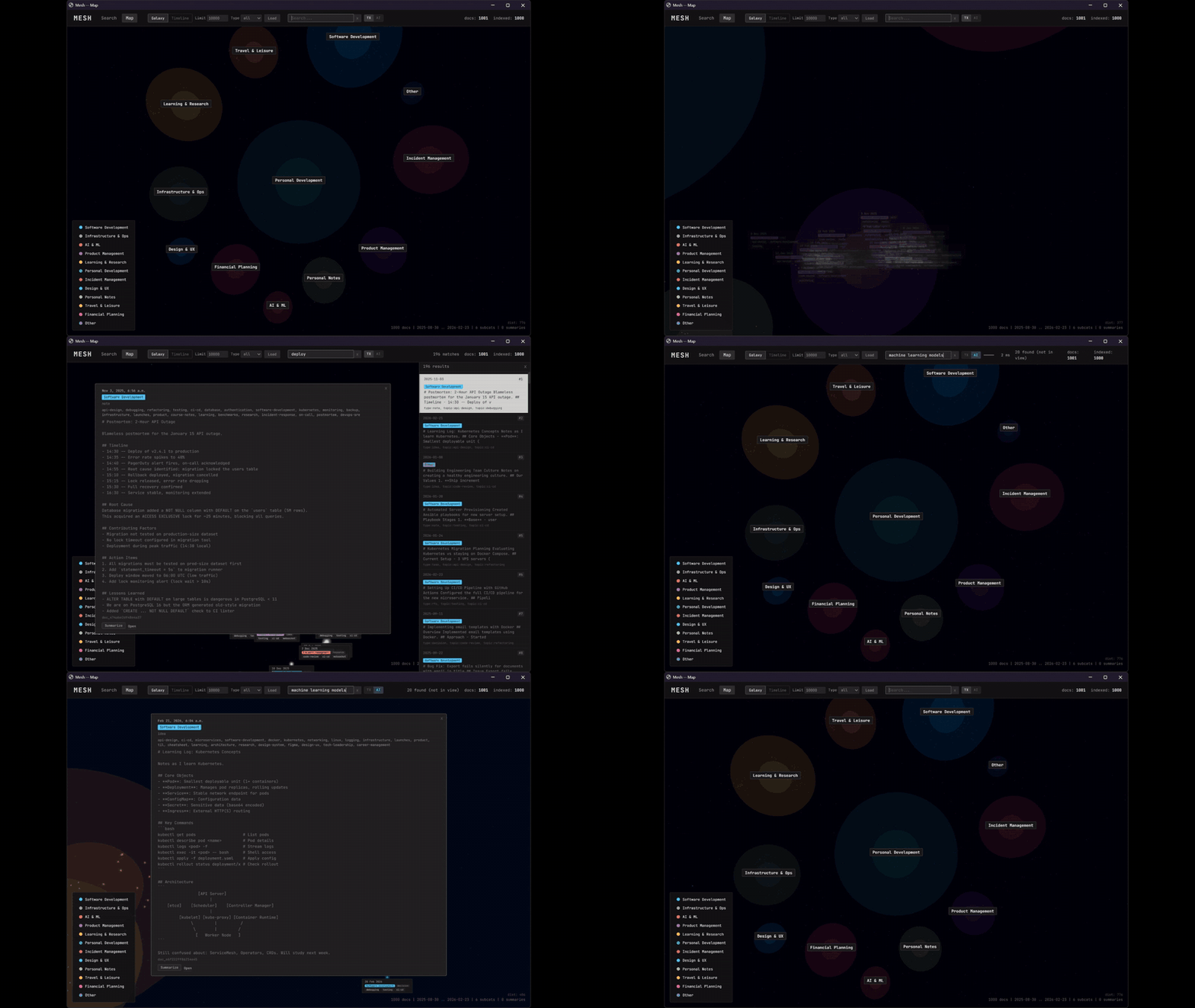
Mesh has three layers: documents (what you save), embeddings (AI-generated vectors), and search (finding by meaning).
When you save a document, Mesh stores it in PostgreSQL, then a background process generates a 768-dimensional embedding vector using the local multilingual-e5-base model. The vector goes into pgvector. Auto-tags (date, source) are added immediately. After embedding, neighbor inference checks the 7 most similar existing documents and copies their common tags.
When you search, your query is embedded the same way, then pgvector finds the closest document vectors by cosine similarity. The result is ranked by meaning, not by word overlap. For multi-workspace search, results from each workspace are weighted according to your priority settings.
For long documents, Mesh chunks the content and generates per-chunk embeddings. Search can match individual chunks, so a relevant paragraph inside a large document still gets found.
Stack: Python, FastAPI, PostgreSQL with pgvector, multilingual-e5-base (560MB, runs locally inside Docker). Single docker compose up to deploy.
Quick Start
# Clone and configure
git clone https://github.com/dklymentiev/mesh-memory.git
cd mesh-memory
cp .env.example .env
# Set POSTGRES_PASSWORD in .env. that's the only required change

# Start (2-3 min on first launch to download model)
docker compose up -d
curl http://localhost:8000/health

# Save a document
curl -X PUT http://localhost:8000/ \
  -H "Content-Type: application/json" \
  -d '{"content": "Decided to use PostgreSQL for the project", "tags": ["type:decision"]}'

# Search by meaning (different words, same idea)
curl -X POST http://localhost:8000/search \
  -d '{"query": "which database did we choose?"}'
Use Cases
For AI agent teams. Give each agent a role-specific memory. Create a sysadmin workspace, a marketing workspace, a developer workspace. Each agent sees only its domain. Pin a role prompt to the workspace and the agent knows who it is. Cross-workspace search when you need interdisciplinary context.
For solo developers. Remember decisions months later. Save architecture decisions, deployment notes, bug investigations. Three months from now, search "why did we choose Redis" and find the detailed reasoning even if you never used the word "Redis" in your search.
For brand and content teams. Build a searchable brand voice. Store brand guidelines, tone examples, approved messaging in a brand workspace. AI agents writing content search that workspace to stay on-brand. Blend 50% brand voice + 50% marketing research for content that is both on-message and data-informed.
Lessons Learned
Workspaces are the killer feature. The original version had no workspace isolation. Everything was in one pool. As the document count grew, search quality degraded because unrelated documents competed for relevance. Workspaces solved this: each role searches its own domain, and cross-workspace search is explicit and weighted. The feature that seemed like an organizational nicety turned out to be essential for search quality.
Auto-tagging beats manual tagging at scale. Asking users (or agents) to tag every document consistently is unrealistic past a few hundred documents. Neighbor inference, copying common tags from similar documents, maintains tag quality automatically. The more documents you have, the better it works. Manual tagging is still supported for precision, but the system does not depend on it.
Local embeddings change everything. Running the embedding model locally (560MB baked into Docker) means no per-query cost, no API rate limits, no privacy concerns, and no dependency on external services. The model is smaller than some npm node_modules directories. This single decision made Mesh viable as always-on infrastructure instead of a cost-per-query tool.
FAQ
What does Mesh do?
Mesh is a memory server that understands meaning. Save notes, decisions, worklogs. Search by describing what you are looking for in plain language. Mesh finds it even if you use completely different words.
How is this different from regular search?
Regular search matches exact keywords. Mesh uses vector embeddings to understand meaning. "Auth bug" finds "login problem." "Which database did we choose?" finds "Decided to use PostgreSQL." Works across 100+ languages.
What are workspaces?
Isolated memory pools by role or project. Marketing, sysadmin, developer, brand voice. Cross-workspace search with weighted priority: 70% sysadmin + 20% security + 10% developer.
Does it require external AI APIs?
No. The embedding model runs locally inside the Docker container. No OpenAI, no cloud APIs, no subscriptions. Your data never leaves your server.
How does auto-tagging work?
Three levels: default tags on save, neighbor inference after embedding (copies common tags from similar documents), and manual tags. No AI API calls needed.